How to configure a Keenetic router to work with Dynamic DNS
Dynamic DNS on a Keenetic is set up in the router's web interface in a few minutes: pick the Other profile and enter the Alviy service address, your domain name, login and password. The screenshot and the value of every field are on this page.
Setting up DDNS
Screenshot of DDNS settings in Keenetic
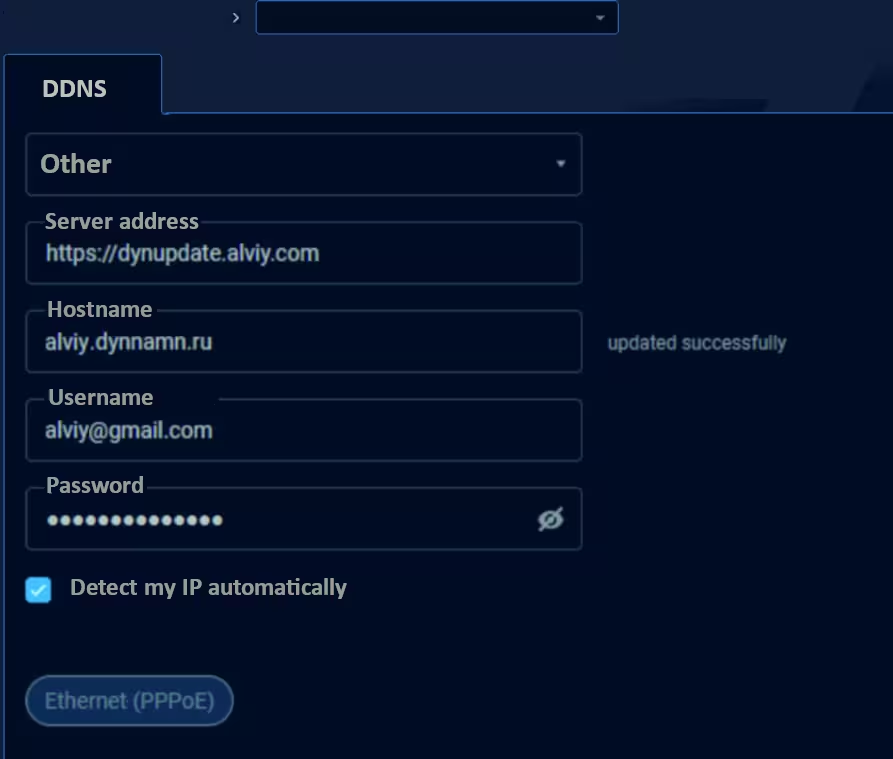
DDNS settings in Keenetic router
Open the settings of your device (for example, a router), usually this is http://192.168.0.1 and configure according to the description:
- Profile:
pick Other
- Server address:
https://dynupdate.alviy.com
- Hostname:
name of your domain
- Username:
login (email or user name)
- Password:
your Alviy credentials
Alternative to DynDNS protocol
Not always the router has all the capabilities for the desired DDNS settings. In this case, there are two options for regularly updating the address:
- Call a GET request to the Secure Update URL, which can be found in the settings of each DynDNS domain at https://cloud.alviy.com/ddns/
- Use client software - DUC (Dynamic Update Client), more details at page