How a reverse proxy works
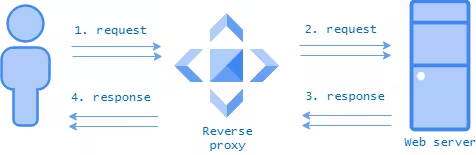
A reverse proxy acts as a single point of traffic delivery for the target server. This protects the servers from direct requests and hides their addresses from the client.
It all starts with the DNS server, which hands the client the reverse proxy's address instead of the origin, routing all requests to the proxy.
- The client sends an HTTP(S) request (for example GET or POST) whose headers carry the site's domain and the URL.
- Without closing the connection to the client, the reverse proxy uses the request data to decide which web server it is meant for; when load balancing is in play, it picks one of several suitable hosts.
- The request is forwarded from the proxy to the web server. To the latter it looks like an ordinary client request, which it processes and answers.
- Having received the answer from the web server, the reverse proxy strips out the internal details and forwards it to the original client.
- Once the client receives the response, it closes the connection to the reverse proxy.
What a reverse proxy is used for
Using a reverse proxy has plenty of advantages. The main scenarios include the following.
Load balancing: distributing incoming requests across several servers, which helps avoid overloading any single one.
Privacy: IP addresses, the web server's provider and internal infrastructure details are hidden from visitors, adding an extra layer of security.
Security: the origin server is unknown to a potential attacker, who cannot scan it or discover vulnerable services such as SSH, RDP, a web service and others.
SSL termination: the reverse proxy takes on SSL encryption and decryption using the most secure cryptography, freeing internal servers from this task and removing the need to buy SSL/TLS certificates.
Architectural flexibility: routine and emergency maintenance of web servers can be done quickly and without disrupting users, by removing and adding them to the balancing pool.