如何配置 Keenetic 路由器以配合 Dynamic DNS 使用
在 Keenetic 的网页管理界面中几分钟即可配置动态 DNS:选择其他配置文件,填写 Alviy 服务地址、您的域名、用户名和密码。本页提供设置界面截图和每个字段的取值。
设置 DDNS
Keenetic 中 DDNS 设置的截图
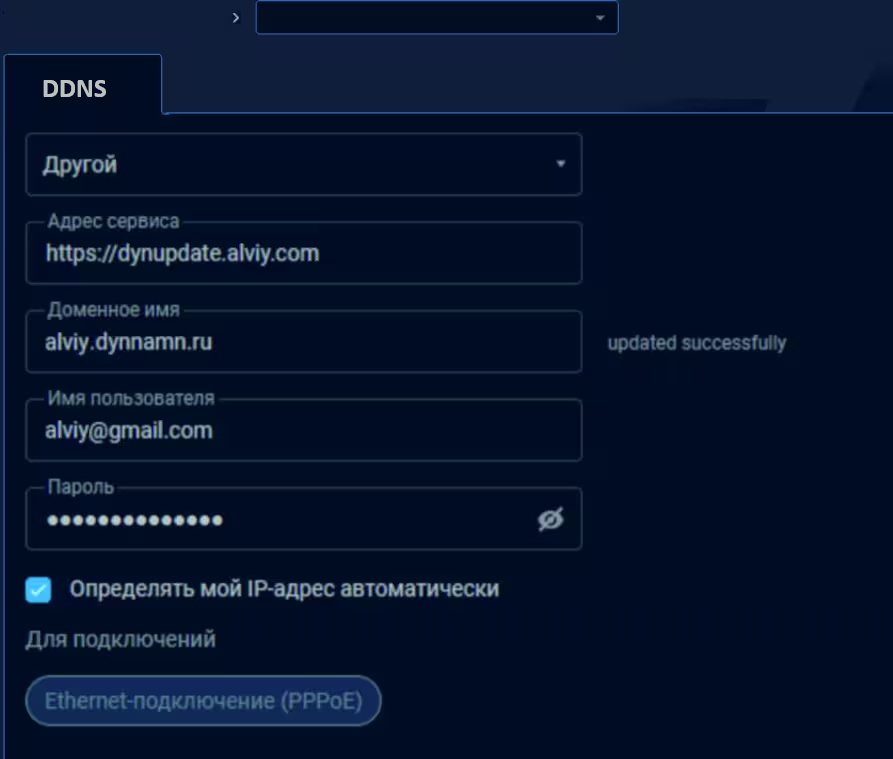
Keenetic 路由器中的 DDNS 参数
打开设备(如路由器)的设置,通常是 http://192.168.0.1 并根据说明进行配置:
- 配置文件:
选择 其他
- 服务地址:
https://dynupdate.alviy.com
- 域名:
您的域名名称
- 用户名:
登录名(login 或 email)
- 密码:
账户密码
DynDNS 协议的替代方案
路由器并不总是具备所需的 DDNS 设置的所有功能。在这种情况下,有两种定期更新地址的选择:
- 调用对安全更新URL 的 GET 请求,该 URL 可在每个 DynDNS 域的设置中找到,网址为 https://cloud.alviy.com/ddns/
- 使用客户端软件 - DUC(动态更新客户端),详情请访问 页面